Details: Actors#
Overview: Types of actors#
SimulationStatisticsActor#
Description#
The SimulationStatisticsActor actor is a very basic tool that allows counting the number of runs, events, tracks, and steps that have been created during a simulation. Most simulations should include this actor as it gives valuable information. The stats object contains the counts dictionary that contains all results.
# ...
stats = sim.add_actor('SimulationStatisticsActor', 'Stats')
stats.track_types_flag = True
# ...

sim.run()
print(stats)
print(stats.counts)
In addition, if the flag track_types_flag is enabled, the actor will save a dictionary structure with all types of particles that have been created during the simulation, which is available as stats.counts.track_types. The start and end time of the whole simulation are available and speeds are estimated (primary per sec, track per sec, and step per sec).
Reference#
- class SimulationStatisticsActor(*args, **kwargs)[source]#
Store statistics about a simulation run.
The class SimulationStatisticsActor has the following user input parameters and default values:
attached_to:
Default value: world
Description: Name of the volume to which the actor is attached.
filters:
Default value: []
Description: Filters used by this actor.
filters_boolean_operator:
Default value: and
Allowed values: (‘and’, ‘or’)
Description: Boolean operator to join the filters of this actor.
mother:
Deprecated: The user input parameter ‘mother’ is deprecated. Use ‘attached_to’ instead.
name (must be provided):
Default value: None
priority:
Default value: 100
Description: Indicates where the actions of this actor should be placed in the list of all actions in the simulation. Low values mean ‘early in the list’, large values mean ‘late in the list’.
track_types_flag:
Default value: False
Description: Should the type of tracks be counted?
DoseActor#
Description#
The DoseActor scores the energy deposition (edep) or absorbed dose map in a given volume. The dose map is a 3D matrix parameterized with: size (number of voxels), spacing (voxel size), and translation (according to the coordinate system of the attached volume) and rotation. By default, the matrix is centered according to the volume center. Note that this virtual scoring grid is independent of a potential geometric grid (e.g. simulation using a voxelized CT image as geometry). The dose map may also have singleton dimensions (dose.size values with 1) reducing its effecctive dimension.
A sample code to score the energy deposition (default) is shown below. Let’s assume a geometry of type box with name “waterbox” is already defined and is [200, 200, 200] *mm big. The dose actor output would now cover the entire size of the “waterbox” and has the same center. .. code-block:: python
dose_act_obj = sim.add_actor(“DoseActor”, “dose_act_obj”) dose_act_obj.output_filename = “test008-edep.mhd” dose_act_obj.attached_to = “waterbox” dose_act_obj.size = [100, 100, 100] mm = gate.g4_units.mm dose_act_obj.spacing = [2 * mm, 2 * mm, 2 * mm]
Adding following lines .. code-block:: python
dose_act_obj.user_output.dose.active True dose_act_obj.user_output.uncertainty.active True
to the dose actor object will trigger an additional image scoring the dose. The unctertainty tag will additionally provide an uncertainty image for each of the scoring quantities. Set user_output.edep.active False to disable the edep computation and only return the dose.
Like any image, the output dose map will have an origin, spacing and orientation. By default, it will consider the coordinate system of the volume it is attached to, so at the center of the image volume. The user can manually change the output origin using the option output_origin of the DoseActor. Alternatively, if the option img_coord_system is set to True, the final output origin will be automatically computed from the image the DoseActor is attached to. This option calls the function get_origin_wrt_images_g4_position to compute the origin.
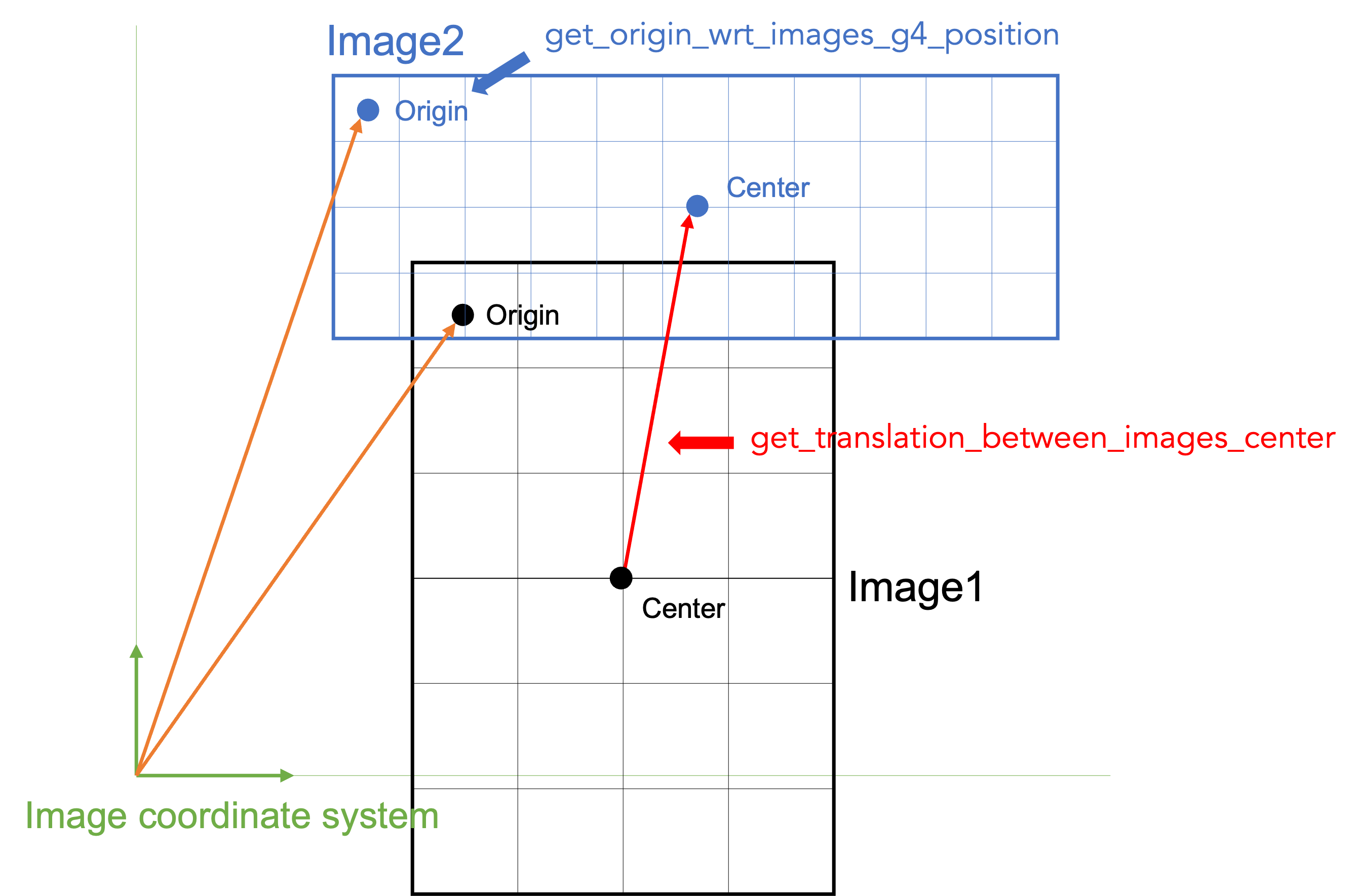
Several tests depict the usage of DoseActor: test008, test009, test021, test035, etc.
- Following would translate and rotate the scoring image:
from scipy.spatial.transform import Rotation dose_act_obj.translation = [2 * mm, 3 * mm, -2 * mm] dose_act_obj.rotation = Rotation.from_euler(“y”, 90, degrees=True).as_matrix()
In this example a uniform scoring object was created for simplicity. To test trans- and rotations, non-uniform sized and spaced voxelized image are highly encouraged.
Reference#
- class DoseActor(*args, **kwargs)[source]#
- DoseActor: compute a 3D map of the deposited
energy/absorbed dose in the volume to which it is attached.
The class DoseActor has the following user input parameters and default values:
attached_to:
Default value: world
Description: Name of the volume to which the actor is attached.
dose:
Deprecated: Use: my_actor.user_output.dose.active=True/False to request the actor to score dose, where ‘my_actor’ should be your actor object. By default, only the deposited energy is scored.
dose_calc_on_the_fly:
Default value: False
Description: FIXME
filters:
Default value: []
Description: Filters used by this actor.
filters_boolean_operator:
Default value: and
Allowed values: (‘and’, ‘or’)
Description: Boolean operator to join the filters of this actor.
hit_type:
Default value: random
Allowed values: (‘random’, ‘pre’, ‘post’, ‘middle’)
Description: How to determine the position to which the deposited quantity is associated, i.e. at the beginning or end of a Geant4 step, or somewhere in between.
img_coord_system:
Deprecated: The user input parameter ‘img_coord_system’ is deprecated. Use my_actor.output_coordinate_system=’attached_to_image’ instead, where my_actor should be replaced with your actor object.
mother:
Deprecated: The user input parameter ‘mother’ is deprecated. Use ‘attached_to’ instead.
name (must be provided):
Default value: None
output:
Deprecated: The output filename is now set via output_filename relative to the output directory of the simulation, which can be set via sim.output_dir. If no output_filename is provided, it will be generated automatically. To specify whether the actor output should be written to disk, use write_to_disk=True/False.
output_coordinate_system:
Default value: local
Allowed values: (‘local’, ‘global’, ‘attached_to_image’, None)
Description: FIXME
priority:
Default value: 100
Description: Indicates where the actions of this actor should be placed in the list of all actions in the simulation. Low values mean ‘early in the list’, large values mean ‘late in the list’.
repeated_volume_index:
Default value: 0
Description: Index of the repeated volume (G4PhysicalVolume) to which this actor is attached. For non-repeated volumes, this value is always 0.
rotation:
Default value: [[1. 0. 0.], [0. 1. 0.], [0. 0. 1.]]
Description: FIXME
score_in:
Default value: material
Allowed values: (‘material’, ‘water’)
Description: In which kind of material should the deposited quantities be scored? ‘material’ means the material defined by the volume to which the actor is attached.
size:
Default value: [10, 10, 10]
Description: 3D size of the dose grid (in number of voxels).
spacing:
Default value: [1.0, 1.0, 1.0]
Description: Voxel spacing along the x-, y-, z-axes. The user sets the units by multiplication with g4_units.XX. The default spacing is in g4_unit.mm.
square:
Deprecated: Use: my_actor.user_output.square.active=True/False to request uncertainty scoring of the respective quantity, where ‘my_actor’ should be your actor object. Note: activating user_output.edep_uncertainty or user_output.dose_uncertainty implies activating user_output.square.
ste_of_mean:
Default value: False
Description: FIXME
ste_of_mean_unbiased:
Default value: False
Description: FIXME
to_water:
Deprecated: Use my_dose_actor.score_in=’water’ instead.
translation:
Default value: [0, 0, 0]
Description: FIXME: Translation with respect to the XXX
uncertainty:
Deprecated: Use: my_actor.user_output.dose_uncertainty.active=True/False andmy_actor.user_output.edep_uncertainty.active=True/False to request uncertainty scoring of the respective quantity, where ‘my_actor’ should be your actor object.
uncertainty_first_check_after_n_events:
Default value: 10000.0
Description: Number of events after which uncertainty is evaluated the first time, for each run.After the first evaluation, the value is updated with an estimation of the N events needed to achieve the target uncertainty.
uncertainty_goal:
Default value: None
Description: If set, it defines the statistical uncertainty at which the run is aborted.
uncertainty_overshoot_factor_N_events:
Default value: 1.05
Description: Factor multiplying the estimated N events needed to achieve the target uncertainty, to ensure faster convergence.
uncertainty_voxel_edep_threshold:
Default value: 0.7
Description: For the calculation of the mean uncertainty of the edep image, only voxels that are above this fraction of the max edep are considered.
LETActor#
Description#
The LET Actor scores the fluence- (also referred to as track-) or dose averaged LET within a volume using a voxelizing parametrization identical to the Dose Actor. Hence, see the Dose Actor documentation for spatial commands like image resolution, origin etc. - the same commands apply for the LET Actor.
Note
In most use cases of LET in literature, only a subset of particles is considered for the calculation of averaged LET, e.g. in proton radiotherapy, where often only protons are considered. Therefore, the LET actor often goes along with a particle filter. See test050 as an example.
Note
Refer to test050 for a current example.
Reference#
- class LETActor(*args, **kwargs)[source]#
This actor scores the Linear Energy Transfer (LET) on a voxel grid in the volume to which the actor is attached. .
The class LETActor has the following user input parameters and default values:
attached_to:
Default value: world
Description: Name of the volume to which the actor is attached.
averaging_method:
Default value: dose_average
Allowed values: (‘dose_average’, ‘track_average’)
Description: How to calculate the LET?
dose_average:
Deprecated: Use averaging_method=’dose_average’ instead
filters:
Default value: []
Description: Filters used by this actor.
filters_boolean_operator:
Default value: and
Allowed values: (‘and’, ‘or’)
Description: Boolean operator to join the filters of this actor.
hit_type:
Default value: random
Allowed values: (‘random’, ‘pre’, ‘post’, ‘middle’)
Description: How to determine the position to which the deposited quantity is associated, i.e. at the beginning or end of a Geant4 step, or somewhere in between.
img_coord_system:
Deprecated: The user input parameter ‘img_coord_system’ is deprecated. Use my_actor.output_coordinate_system=’attached_to_image’ instead, where my_actor should be replaced with your actor object.
let_to_other_material:
Deprecated: Use score_in= to specify in which material LET should be scored.
let_to_water:
Deprecated: Use score_in= to specify in which material LET should be scored.
mother:
Deprecated: The user input parameter ‘mother’ is deprecated. Use ‘attached_to’ instead.
name (must be provided):
Default value: None
other_material:
Deprecated: Use score_in= to specify in which material LET should be scored.
output:
Deprecated: The output filename is now set via output_filename relative to the output directory of the simulation, which can be set via sim.output_dir. If no output_filename is provided, it will be generated automatically. To specify whether the actor output should be written to disk, use write_to_disk=True/False.
output_coordinate_system:
Default value: local
Allowed values: (‘local’, ‘global’, ‘attached_to_image’, None)
Description: FIXME
priority:
Default value: 100
Description: Indicates where the actions of this actor should be placed in the list of all actions in the simulation. Low values mean ‘early in the list’, large values mean ‘late in the list’.
repeated_volume_index:
Default value: 0
Description: Index of the repeated volume (G4PhysicalVolume) to which this actor is attached. For non-repeated volumes, this value is always 0.
rotation:
Default value: [[1. 0. 0.], [0. 1. 0.], [0. 0. 1.]]
Description: FIXME
score_in:
Default value: G4_WATER
Description: In which material should the LET be scored? You can provide a valid G4 material name, the term ‘water’, or the term ‘material’ which means ‘the local material where LET is scored.
separate_output:
Deprecated: Denominator and numerator images are automatically handled and stored.
size:
Default value: [10, 10, 10]
Description: 3D size of the dose grid (in number of voxels).
spacing:
Default value: [1.0, 1.0, 1.0]
Description: Voxel spacing along the x-, y-, z-axes. The user sets the units by multiplication with g4_units.XX. The default spacing is in g4_unit.mm.
track_average:
Deprecated: Use averaging_method=’track_average’ instead
translation:
Default value: [0, 0, 0]
Description: FIXME: Translation with respect to the XXX
FluenceActor#
Description#
This actor scores the particle fluence on a voxel grid, essentially by counting the number of particles passing through each voxel. The FluenceActor will be extended in the future with features to handle scattered radiation, e.g. in cone beam CT imaging.
Reference#
- class FluenceActor(*args, **kwargs)[source]#
FluenceActor: compute a 3D map of fluence FIXME: add scatter order and uncertainty
The class FluenceActor has the following user input parameters and default values:
attached_to:
Default value: world
Description: Name of the volume to which the actor is attached.
filters:
Default value: []
Description: Filters used by this actor.
filters_boolean_operator:
Default value: and
Allowed values: (‘and’, ‘or’)
Description: Boolean operator to join the filters of this actor.
hit_type:
Default value: random
Allowed values: (‘random’, ‘pre’, ‘post’, ‘middle’)
Description: How to determine the position to which the deposited quantity is associated, i.e. at the beginning or end of a Geant4 step, or somewhere in between.
img_coord_system:
Deprecated: The user input parameter ‘img_coord_system’ is deprecated. Use my_actor.output_coordinate_system=’attached_to_image’ instead, where my_actor should be replaced with your actor object.
mother:
Deprecated: The user input parameter ‘mother’ is deprecated. Use ‘attached_to’ instead.
name (must be provided):
Default value: None
output:
Deprecated: The output filename is now set via output_filename relative to the output directory of the simulation, which can be set via sim.output_dir. If no output_filename is provided, it will be generated automatically. To specify whether the actor output should be written to disk, use write_to_disk=True/False.
output_coordinate_system:
Default value: local
Allowed values: (‘local’, ‘global’, ‘attached_to_image’, None)
Description: FIXME
priority:
Default value: 100
Description: Indicates where the actions of this actor should be placed in the list of all actions in the simulation. Low values mean ‘early in the list’, large values mean ‘late in the list’.
repeated_volume_index:
Default value: 0
Description: Index of the repeated volume (G4PhysicalVolume) to which this actor is attached. For non-repeated volumes, this value is always 0.
rotation:
Default value: [[1. 0. 0.], [0. 1. 0.], [0. 0. 1.]]
Description: FIXME
scatter:
Default value: False
Description: FIXME
size:
Default value: [10, 10, 10]
Description: 3D size of the dose grid (in number of voxels).
spacing:
Default value: [1.0, 1.0, 1.0]
Description: Voxel spacing along the x-, y-, z-axes. The user sets the units by multiplication with g4_units.XX. The default spacing is in g4_unit.mm.
translation:
Default value: [0, 0, 0]
Description: FIXME: Translation with respect to the XXX
uncertainty:
Default value: False
Description: FIXME
TLEDoseActor#
Description#
This is a variant of the normal DoseActor which scores dose due to low energy gammas in another way, namely via the track length in the given voxel. Most options as well as the output are identical to the DoseActor.
Reference#
- class TLEDoseActor(*args, **kwargs)[source]#
TLE = Track Length Estimator
The class TLEDoseActor has the following user input parameters and default values:
attached_to:
Default value: world
Description: Name of the volume to which the actor is attached.
database:
Default value: EPDL
Allowed values: (‘EPDL’, ‘NIST’)
Description: which database to use
dose:
Deprecated: Use: my_actor.user_output.dose.active=True/False to request the actor to score dose, where ‘my_actor’ should be your actor object. By default, only the deposited energy is scored.
dose_calc_on_the_fly:
Default value: False
Description: FIXME
energy_max:
Default value: 1.0
Description: Above this energy, do not perform TLE (TLE is only relevant for low energy gamma)
energy_min:
Default value: 0.0
Description: Kill the gamma if below this energy
filters:
Default value: []
Description: Filters used by this actor.
filters_boolean_operator:
Default value: and
Allowed values: (‘and’, ‘or’)
Description: Boolean operator to join the filters of this actor.
hit_type:
Default value: random
Allowed values: (‘random’, ‘pre’, ‘post’, ‘middle’)
Description: How to determine the position to which the deposited quantity is associated, i.e. at the beginning or end of a Geant4 step, or somewhere in between.
img_coord_system:
Deprecated: The user input parameter ‘img_coord_system’ is deprecated. Use my_actor.output_coordinate_system=’attached_to_image’ instead, where my_actor should be replaced with your actor object.
mother:
Deprecated: The user input parameter ‘mother’ is deprecated. Use ‘attached_to’ instead.
name (must be provided):
Default value: None
output:
Deprecated: The output filename is now set via output_filename relative to the output directory of the simulation, which can be set via sim.output_dir. If no output_filename is provided, it will be generated automatically. To specify whether the actor output should be written to disk, use write_to_disk=True/False.
output_coordinate_system:
Default value: local
Allowed values: (‘local’, ‘global’, ‘attached_to_image’, None)
Description: FIXME
priority:
Default value: 100
Description: Indicates where the actions of this actor should be placed in the list of all actions in the simulation. Low values mean ‘early in the list’, large values mean ‘late in the list’.
repeated_volume_index:
Default value: 0
Description: Index of the repeated volume (G4PhysicalVolume) to which this actor is attached. For non-repeated volumes, this value is always 0.
rotation:
Default value: [[1. 0. 0.], [0. 1. 0.], [0. 0. 1.]]
Description: FIXME
score_in:
Default value: material
Allowed values: (‘material’, ‘water’)
Description: In which kind of material should the deposited quantities be scored? ‘material’ means the material defined by the volume to which the actor is attached.
size:
Default value: [10, 10, 10]
Description: 3D size of the dose grid (in number of voxels).
spacing:
Default value: [1.0, 1.0, 1.0]
Description: Voxel spacing along the x-, y-, z-axes. The user sets the units by multiplication with g4_units.XX. The default spacing is in g4_unit.mm.
square:
Deprecated: Use: my_actor.user_output.square.active=True/False to request uncertainty scoring of the respective quantity, where ‘my_actor’ should be your actor object. Note: activating user_output.edep_uncertainty or user_output.dose_uncertainty implies activating user_output.square.
ste_of_mean:
Default value: False
Description: FIXME
ste_of_mean_unbiased:
Default value: False
Description: FIXME
to_water:
Deprecated: Use my_dose_actor.score_in=’water’ instead.
translation:
Default value: [0, 0, 0]
Description: FIXME: Translation with respect to the XXX
uncertainty:
Deprecated: Use: my_actor.user_output.dose_uncertainty.active=True/False andmy_actor.user_output.edep_uncertainty.active=True/False to request uncertainty scoring of the respective quantity, where ‘my_actor’ should be your actor object.
uncertainty_first_check_after_n_events:
Default value: 10000.0
Description: Number of events after which uncertainty is evaluated the first time, for each run.After the first evaluation, the value is updated with an estimation of the N events needed to achieve the target uncertainty.
uncertainty_goal:
Default value: None
Description: If set, it defines the statistical uncertainty at which the run is aborted.
uncertainty_overshoot_factor_N_events:
Default value: 1.05
Description: Factor multiplying the estimated N events needed to achieve the target uncertainty, to ensure faster convergence.
uncertainty_voxel_edep_threshold:
Default value: 0.7
Description: For the calculation of the mean uncertainty of the edep image, only voxels that are above this fraction of the max edep are considered.
VoxelDepositActor#
This is a common base class used by the actors that scored quantities deposited on voxel grid like the DoseActor, LETActor, FluenceActor, TLEDoseActor.
Important
You cannot use this actor directly in your simulation.
PhaseSpaceActor#
Description#
A PhaseSpaceActor stores any set of particles reaching a given volume during the simulation. The list of attributes that are kept for each stored particle can be specified by the user.
phsp = sim.add_actor("PhaseSpaceActor", "PhaseSpace")
phsp.attached_to = plane.name
phsp.attributes = [
    "KineticEnergy",
    "Weight",
    "PostPosition",
    "PrePosition",
    "ParticleName",
    "PreDirection",
    "PostDirection",
    "TimeFromBeginOfEvent",
    "GlobalTime",
    "LocalTime",
    "EventPosition",
]
phsp.output_filename = "test019_hits.root"
f = sim.add_filter("ParticleFilter", "f")
f.particle = "gamma"
phsp.filters.append(f)
In this example, the PhaseSpaceActor will store all particles reaching the given plane. For each particle, some information will be stored, as shown in the attributes array: energy, position, name, time, etc. The list of available attribute names can be found in the file: GateDigiAttributeList.cpp.
The output is a ROOT file that contains a tree. It can be analyzed, for example, with uproot.
By default, the PhaseSpaceActor stores information about particles entering the volume. This behavior can be modified by the following options:
phsp.steps_to_store = "entering"  # this is the default
phsp.steps_to_store = "entering exiting first"  # other options (combined)
The option “first” stores the particle information when it enters the volume to which the actor is attached for the first time. The variables to be used are the PrePosition, PreDirection, etc.
The option “entering” stores the particle information whenever it is at the boundary between the surrounding environment (world, another volume) and the volume to which the actor is attached. The variables to be used are the PrePosition, PreDirection, etc. For example: if a particle enters the volume only once, its information is stored only once; the option entering is equal to the option first. If a particle passes through a volume, performs n scattering outside of it, and re-enters the volume, its entry information will be stored n times. If a particle interacts with the volume interfaces without exiting the volume (e.g., the reflection of optical photons), the actor will store all instances when the particle is at the boundary (all reflections are stored).
The option “exiting” stores the particle information whenever, starting from within the volume, it is at the boundary between the volume to which the actor is attached and the surrounding environment (world, another volume). The variables to be used are the PostPosition, PostDirection, etc.
Reference#
- class PhaseSpaceActor(*args, **kwargs)[source]#
Similar to HitsCollectionActor : store a list of hits. However only the first hit of given event is stored here.
The class PhaseSpaceActor has the following user input parameters and default values:
attached_to:
Default value: world
Description: Name of the volume to which the actor is attached.
attributes:
Default value: []
Description: FIXME
authorize_repeated_volumes:
Default value: False
Description: User must say explicitly that the digitizer can work with repeated volumes
debug:
Default value: False
Description: print debug info
filters:
Default value: []
Description: Filters used by this actor.
filters_boolean_operator:
Default value: and
Allowed values: (‘and’, ‘or’)
Description: Boolean operator to join the filters of this actor.
mother:
Deprecated: The user input parameter ‘mother’ is deprecated. Use ‘attached_to’ instead.
name (must be provided):
Default value: None
priority:
Default value: 100
Description: Indicates where the actions of this actor should be placed in the list of all actions in the simulation. Low values mean ‘early in the list’, large values mean ‘late in the list’.
steps_to_store:
Default value: entering
Description: FIXME entering exiting first (can be combined)
store_absorbed_event:
Default value: False
Description: FIXME
DigitizerHitsCollectionActor#
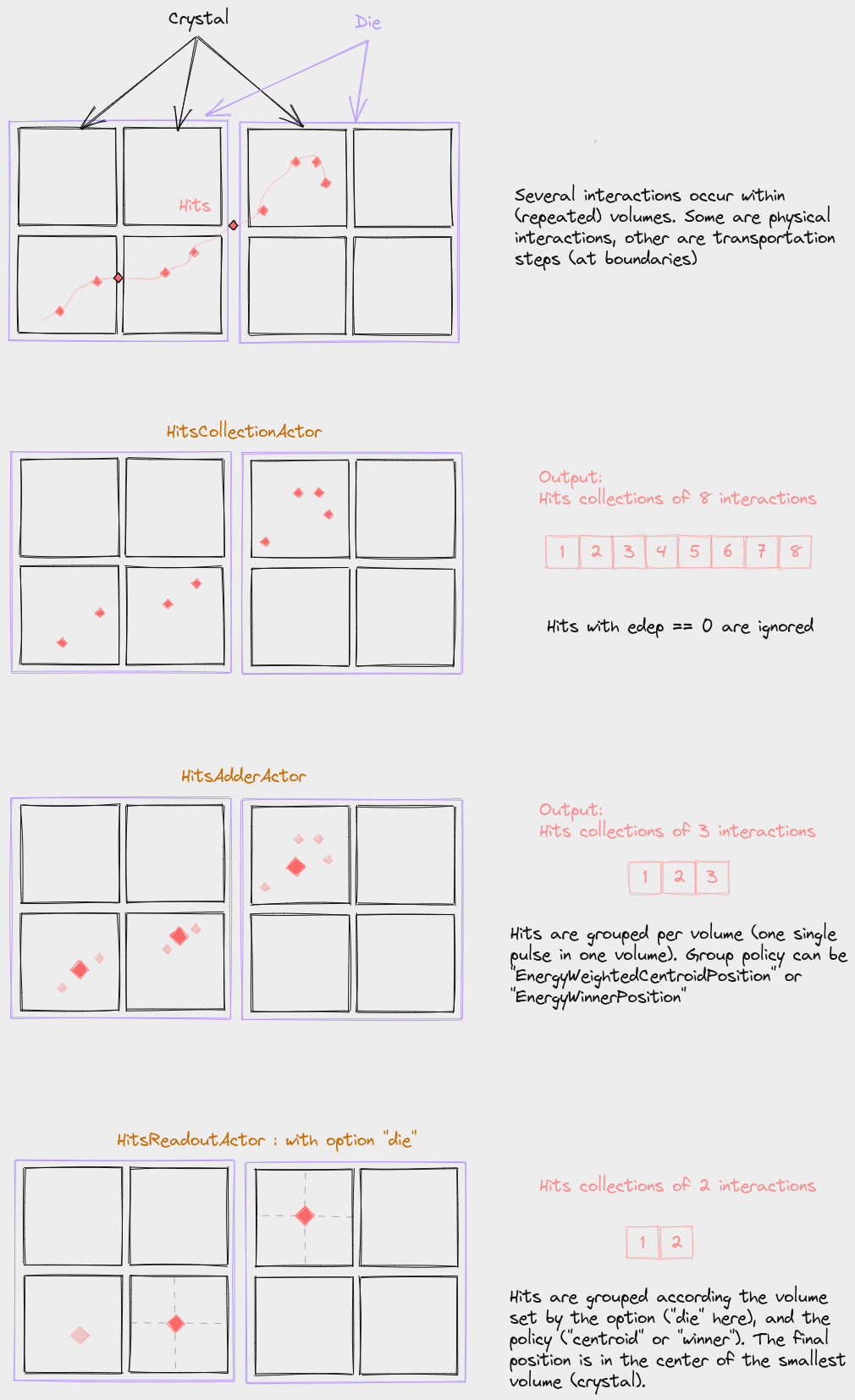
The DigitizerHitsCollectionActor collects hits occurring in a given volume (or its daughter volumes). Every time a step occurs in the volume, a list of attributes is recorded. The list of attributes is defined by the user:
hc = sim.add_actor('DigitizerHitsCollectionActor', 'Hits')
hc.attached_to = ['crystal1', 'crystal2']
hc.output_filename = 'test_hits.root'
hc.attributes = ['TotalEnergyDeposit', 'KineticEnergy', 'PostPosition',
                 'CreatorProcess', 'GlobalTime', 'VolumeName', 'RunID', 'ThreadID', 'TrackID']
In this example, the actor is attached to (attached_to option) several volumes (crystal1 and crystal2 ) but most of the time, one single volume is sufficient. This volume is important: every time an interaction (a step) is occurring in this volume, a hit will be created. The list of attributes is defined with the given array of attribute names. The names of the attributes are as close as possible to the Geant4 terminology. They can be of a few types: 3 (ThreeVector), D (double), S (string), I (int), U (unique volume ID, see DigitizerAdderActor section). The list of available attributes is defined in the file GateDigiAttributeList.cpp and can be printed with:
import opengate_core as gate_core
am = gate_core.GateDigiAttributeManager.GetInstance()
print(am.GetAvailableDigiAttributeNames())
Warning
KineticEnergy, Position and Direction are available for PreStep and for PostStep, and there is a “default” version corresponding to the legacy Gate (9.X).
Pre version |
Post version |
default version |
|---|---|---|
PreKineticEnergy |
PostKineticEnergy |
KineticEnergy (Pre) |
PrePosition |
PostPosition |
Position (Post) |
PreDirection |
PostDirection |
Direction (Post) |
Attribute correspondence with Gate 9.X for Hits and Singles:
Gate 9.X |
Gate 10 |
|---|---|
edep or energy |
TotalEnergyDeposit |
posX/Y/Z of globalPosX/Y/Z |
PostPosition_X/Y/Z |
time |
GlobalTime |
At the end of the simulation, the list of hits can be written as a root file and/or used by subsequent digitizer modules (see next sections). The Root output is optional, if the output name is None nothing will be written. Note that, like in Gate, every hit with zero deposited energy is ignored. If you need them, you should probably use a PhaseSpaceActor. Several tests using DigitizerHitsCollectionActor are proposed: test025, test028, test035, etc.
The actors used to convert some hits to one digi are DigitizerHitsAdderActor and DigitizerReadoutActor (see next sections).
Reference#
- class DigitizerHitsCollectionActor(*args, **kwargs)[source]#
Build a list of hits in a given volume. - the list of attributes to be stored is given in the ‘attributes’ options - output as root
The class DigitizerHitsCollectionActor has the following user input parameters and default values:
attached_to:
Default value: world
Description: Name of the volume to which the actor is attached.
attributes:
Default value: []
Description: Attributes to be considered.
authorize_repeated_volumes:
Default value: False
Description: User must say explicitly that the digitizer can work with repeated volumes
clear_every:
Default value: 100000.0
Description: FIXME
debug:
Default value: False
Description: FIXME
filters:
Default value: []
Description: Filters used by this actor.
filters_boolean_operator:
Default value: and
Allowed values: (‘and’, ‘or’)
Description: Boolean operator to join the filters of this actor.
keep_zero_edep:
Default value: False
Description: FIXME
mother:
Deprecated: The user input parameter ‘mother’ is deprecated. Use ‘attached_to’ instead.
name (must be provided):
Default value: None
priority:
Default value: 100
Description: Indicates where the actions of this actor should be placed in the list of all actions in the simulation. Low values mean ‘early in the list’, large values mean ‘late in the list’.
DigitizerAdderActor#
Description#
This actor groups the hits per different volumes according to the option group_volume (by default, this is the deeper volume that contains the hit). All hits occurring in the same event in the same volume are gathered into one single digi according to one of two available policies:
EnergyWeightedCentroidPosition: - The final energy (TotalEnergyDeposit) is the sum of all deposited energy. - The position (PostPosition) is the energy-weighted centroid position. - The time (GlobalTime) is the time of the earliest hit.
EnergyWinnerPosition: - The final energy (TotalEnergyDeposit) is the energy of the hit with the largest deposited energy. - The position (PostPosition) is the position of the hit with the largest deposited energy. - The time (GlobalTime) is the time of the earliest hit.
sc = sim.add_actor("DigitizerAdderActor", "Singles")
sc.output_filename = 'test_hits.root'
sc.input_digi_collection = "Hits"
sc.policy = "EnergyWeightedCentroidPosition"
# sc.policy = "EnergyWinnerPosition"
sc.group_volume = crystal.name
Note
This actor is only triggered at the end of an event, so the attached_to volume has no effect. Examples are available in test 037.
Reference#
- class DigitizerAdderActor(*args, **kwargs)[source]#
- Equivalent to Gate “adder”: gather all hits of an event in the same volume.
Input: a HitsCollection, need aat least TotalEnergyDeposit and PostPosition attributes Output: a Single collections
Policies: - EnergyWinnerPosition: consider position and energy of the hit with the max energy for all other attributes (Time, etc.): the value of the winner is used. - EnergyWeightedCentroidPosition: computed the energy-weighted centroid position for all other attributes (Time, etc.): the value the last seen hit is used.
The class DigitizerAdderActor has the following user input parameters and default values:
attached_to:
Default value: world
Description: Name of the volume to which the actor is attached.
attributes:
Default value: []
Description: Attributes to be considered.
authorize_repeated_volumes:
Default value: False
Description: User must say explicitly that the digitizer can work with repeated volumes
clear_every:
Default value: 100000.0
Description: FIXME
filters:
Default value: []
Description: Filters used by this actor.
filters_boolean_operator:
Default value: and
Allowed values: (‘and’, ‘or’)
Description: Boolean operator to join the filters of this actor.
group_volume:
Default value: None
Description: FIXME
input_digi_collection:
Default value: Hits
Description: Digi collection to be used as input.
mother:
Deprecated: The user input parameter ‘mother’ is deprecated. Use ‘attached_to’ instead.
name (must be provided):
Default value: None
number_of_hits:
Default value: False
Description: FIXME
output:
Deprecated: Use output_filename instead.
policy:
Default value: EnergyWinnerPosition
Allowed values: (‘EnergyWeightedCentroidPosition’, ‘EnergyWinnerPosition’)
Description: Digi collection to be used as input.
priority:
Default value: 100
Description: Indicates where the actions of this actor should be placed in the list of all actions in the simulation. Low values mean ‘early in the list’, large values mean ‘late in the list’.
skip_attributes:
Default value: []
Description: FIXME
time_difference:
Default value: False
Description: FIXME
DigitizerReadoutActor#
Description#
This actor is similar to the DigitizerAdderActor, with one additional option: the resulting positions of the digi are set at the center of the defined volumes (discretized). The option discretize_volume indicates the volume name where the discrete position will be taken.
sc = sim.add_actor("HitsReadoutActor", "Singles")
sc.input_digi_collection = "Hits"
sc.group_volume = stack.name
sc.discretize_volume = crystal.name
sc.policy = "EnergyWeightedCentroidPosition"
Examples are available in test 037.
Reference#
- class DigitizerReadoutActor(*args, **kwargs)[source]#
This actor is a DigitizerAdderActor + a discretization step: the final position is the center of the volume
The class DigitizerReadoutActor has the following user input parameters and default values:
attached_to:
Default value: world
Description: Name of the volume to which the actor is attached.
attributes:
Default value: []
Description: Attributes to be considered.
authorize_repeated_volumes:
Default value: False
Description: User must say explicitly that the digitizer can work with repeated volumes
clear_every:
Default value: 100000.0
Description: FIXME
discretize_volume:
Default value: None
Description: FIXME
filters:
Default value: []
Description: Filters used by this actor.
filters_boolean_operator:
Default value: and
Allowed values: (‘and’, ‘or’)
Description: Boolean operator to join the filters of this actor.
group_volume:
Default value: None
Description: FIXME
input_digi_collection:
Default value: Hits
Description: Digi collection to be used as input.
mother:
Deprecated: The user input parameter ‘mother’ is deprecated. Use ‘attached_to’ instead.
name (must be provided):
Default value: None
number_of_hits:
Default value: False
Description: FIXME
output:
Deprecated: Use output_filename instead.
policy:
Default value: EnergyWinnerPosition
Allowed values: (‘EnergyWeightedCentroidPosition’, ‘EnergyWinnerPosition’)
Description: Digi collection to be used as input.
priority:
Default value: 100
Description: Indicates where the actions of this actor should be placed in the list of all actions in the simulation. Low values mean ‘early in the list’, large values mean ‘late in the list’.
skip_attributes:
Default value: []
Description: FIXME
time_difference:
Default value: False
Description: FIXME
DigitizerBlurringActor#
Description#
This module applies blurring to an attribute, such as time or energy. The method can be Gaussian, InverseSquare, or Linear:
For Gaussian blurring, specify the sigma or FWHM with blur_sigma or blur_fwhm.
For InverseSquare blurring, use blur_reference_value and blur_reference_value (equation TBD).
For Linear blurring, specify blur_reference_value, blur_slope, and blur_reference_value (equation TBD).
bc = sim.add_actor("DigitizerBlurringActor", "Singles_with_blur")
bc.output_filename = "output.root"
bc.input_digi_collection = "Singles_readout"
bc.blur_attribute = "GlobalTime"
bc.blur_method = "Gaussian"
bc.blur_fwhm = 100 * ns
Reference#
- class DigitizerBlurringActor(*args, **kwargs)[source]#
Digitizer module for blurring an attribute (single value only, not a vector). Usually for energy or time.
The class DigitizerBlurringActor has the following user input parameters and default values:
attached_to:
Default value: world
Description: Name of the volume to which the actor is attached.
authorize_repeated_volumes:
Default value: False
Description: User must say explicitly that the digitizer can work with repeated volumes
blur_attribute:
Default value: None
Description: FIXME
blur_fwhm:
Default value: None
Description: FIXME
blur_method:
Default value: Gaussian
Allowed values: (‘Gaussian’, ‘InverseSquare’, ‘Linear’)
Description: FIXME
blur_reference_value:
Default value: 0
Description: FIXME
blur_resolution:
Default value: 0
Description: FIXME
blur_sigma:
Default value: None
Description: FIXME
blur_slope:
Default value: 0
Description: FIXME
clear_every:
Default value: 100000.0
Description: FIXME
filters:
Default value: []
Description: Filters used by this actor.
filters_boolean_operator:
Default value: and
Allowed values: (‘and’, ‘or’)
Description: Boolean operator to join the filters of this actor.
input_digi_collection:
Default value: Hits
Description: Digi collection to be used as input.
mother:
Deprecated: The user input parameter ‘mother’ is deprecated. Use ‘attached_to’ instead.
name (must be provided):
Default value: None
priority:
Default value: 100
Description: Indicates where the actions of this actor should be placed in the list of all actions in the simulation. Low values mean ‘early in the list’, large values mean ‘late in the list’.
skip_attributes:
Default value: []
Description: FIXME
DigitizerSpatialBlurringActor#
Description#
The blurring operation may cause points to fall outside the volume. If you want to forbud this, use the keep_in_solid_limits option. This is useful for monolithic crystals, but should not be used for pixelated crystals.
Reference#
- class DigitizerSpatialBlurringActor(*args, **kwargs)[source]#
Digitizer module for blurring a (global) spatial position.
The class DigitizerSpatialBlurringActor has the following user input parameters and default values:
attached_to:
Default value: world
Description: Name of the volume to which the actor is attached.
attributes:
Default value: []
Description: Attributes to be considered.
authorize_repeated_volumes:
Default value: False
Description: User must say explicitly that the digitizer can work with repeated volumes
blur_attribute:
Default value: None
Description: FIXME
blur_fwhm:
Default value: None
Description: FIXME
blur_sigma:
Default value: None
Description: FIXME
clear_every:
Default value: 100000
Description: FIXME
filters:
Default value: []
Description: Filters used by this actor.
filters_boolean_operator:
Default value: and
Allowed values: (‘and’, ‘or’)
Description: Boolean operator to join the filters of this actor.
input_digi_collection:
Default value: Hits
Description: FIXME
keep_in_solid_limits:
Default value: True
Description: FIXME
mother:
Deprecated: The user input parameter ‘mother’ is deprecated. Use ‘attached_to’ instead.
name (must be provided):
Default value: None
priority:
Default value: 100
Description: Indicates where the actions of this actor should be placed in the list of all actions in the simulation. Low values mean ‘early in the list’, large values mean ‘late in the list’.
skip_attributes:
Default value: []
Description: FIXME
DigitizerEnergyWindowsActor#
Description#
The DigitizerEnergyWindowsActor is used in both PET and SPECT simulations to define energy windows that filter particles by energy range. This helps to reduce noise and select relevant events.
For PET, the window is centered around the 511 keV annihilation photon:
# EnergyWindows for PET
ew = sim.add_actor("DigitizerEnergyWindowsActor", "EnergyWindows")
ew.attached_to = hc.attached_to
ew.input_digi_collection = "Singles"
ew.channels = [{"name": ew.name, "min": 425 * keV, "max": 650 * keV}]  # 511 keV window
ew.output_filename = root_name
For SPECT, the windows can be more complex, with multiple channels:
# EnergyWindows for SPECT
ew = sim.add_actor("DigitizerEnergyWindowsActor", "EnergyWindows")
ew.attached_to = hc.attached_to
ew.input_digi_collection = "Singles"
ew.channels = [
    {"name": "scatter", "min": 114 * keV, "max": 126 * keV},
    {"name": "peak140", "min": 126 * keV, "max": 154.55 * keV},  # Tc-99m
]
ew.output_filename = hc.output_filename
For PET, refer to test037; for SPECT, refer to test028.
Reference#
- class DigitizerEnergyWindowsActor(*args, **kwargs)[source]#
Consider a list of hits and arrange them according to energy intervals. Input: one DigiCollection Output: as many DigiCollections as the number of energy windows
The class DigitizerEnergyWindowsActor has the following user input parameters and default values:
attached_to:
Default value: world
Description: Name of the volume to which the actor is attached.
attributes:
Default value: []
Description: Attributes to be considered.
authorize_repeated_volumes:
Default value: False
Description: User must say explicitly that the digitizer can work with repeated volumes
channels:
Default value: []
Description: FIXME
clear_every:
Default value: 100000.0
Description: FIXME
filters:
Default value: []
Description: Filters used by this actor.
filters_boolean_operator:
Default value: and
Allowed values: (‘and’, ‘or’)
Description: Boolean operator to join the filters of this actor.
input_digi_collection:
Default value: Hits
Description: FIXME
mother:
Deprecated: The user input parameter ‘mother’ is deprecated. Use ‘attached_to’ instead.
name (must be provided):
Default value: None
priority:
Default value: 100
Description: Indicates where the actions of this actor should be placed in the list of all actions in the simulation. Low values mean ‘early in the list’, large values mean ‘late in the list’.
skip_attributes:
Default value: []
Description: FIXME
DigitizerProjectionActor#
Description#
The DigitizerProjectionActor generates 2D projections from digitized particle hits in SPECT or PET simulations. It takes input collections and creates a projection image based on predefined grid spacing and size.
proj = sim.add_actor("DigitizerProjectionActor", "Projection")
proj.attached_to = hc.attached_to  # Attach to crystal volume
proj.input_digi_collections = ["scatter", "peak140", "Singles"]  # Use multiple energy channels
proj.spacing = [4.41806 * mm, 4.41806 * mm]  # Set pixel spacing in mm
proj.size = [128, 128]  # Image size in pixels (128x128)
proj.origin_as_image_center = False  # Origin is not at image center
proj.output_filename = 'projection.mhd'
Refer to test028 for SPECT examples.
Reference#
- class DigitizerProjectionActor(*args, **kwargs)[source]#
This actor takes as input HitsCollections and performed binning in 2D images. If there are several HitsCollection as input, the slices will correspond to each HC. If there are several runs, images will also be slice-stacked.
The class DigitizerProjectionActor has the following user input parameters and default values:
attached_to:
Default value: world
Description: Name of the volume to which the actor is attached.
authorize_repeated_volumes:
Default value: False
Description: User must say explicitly that the digitizer can work with repeated volumes
detector_orientation_matrix:
Default value: [[1. 0. 0.], [0. 1. 0.], [0. 0. 1.]]
Description: FIXME
filters:
Default value: []
Description: Filters used by this actor.
filters_boolean_operator:
Default value: and
Allowed values: (‘and’, ‘or’)
Description: Boolean operator to join the filters of this actor.
input_digi_collections:
Default value: [‘Hits’]
Description: FIXME
mother:
Deprecated: The user input parameter ‘mother’ is deprecated. Use ‘attached_to’ instead.
name (must be provided):
Default value: None
origin_as_image_center:
Default value: True
Description: FIXME
physical_volume_index:
Default value: -1
Description: When attached to a repeated volume, this option indicate which copy is used
priority:
Default value: 100
Description: Indicates where the actions of this actor should be placed in the list of all actions in the simulation. Low values mean ‘early in the list’, large values mean ‘late in the list’.
size:
Default value: [128, 128]
Description: FIXME
spacing:
Default value: [4.0, 4.0]
Description: FIXME
DigitizerEfficiencyActor#
Description#
This module simulates detection with non-100% efficiency, which can be set as a float between 0 and 1 (where 1 means all digis are stored). For each digi, a random number determines if the digi is kept.
ea = sim.add_actor("DigitizerEfficiencyActor", "Efficiency")
ea.input_digi_collection = "Hits"
ea.efficiency = 0.3
Refer to test057 for more details.
Reference#
- class DigitizerEfficiencyActor(*args, **kwargs)[source]#
Digitizer module for simulating efficiency.
The class DigitizerEfficiencyActor has the following user input parameters and default values:
attached_to:
Default value: world
Description: Name of the volume to which the actor is attached.
attributes:
Default value: []
Description: Attributes to be considered.
authorize_repeated_volumes:
Default value: False
Description: User must say explicitly that the digitizer can work with repeated volumes
clear_every:
Default value: 100000.0
Description: FIXME
efficiency:
Default value: 1.0
Description: FIXME
filters:
Default value: []
Description: Filters used by this actor.
filters_boolean_operator:
Default value: and
Allowed values: (‘and’, ‘or’)
Description: Boolean operator to join the filters of this actor.
input_digi_collection:
Default value: Hits
Description: FIXME
mother:
Deprecated: The user input parameter ‘mother’ is deprecated. Use ‘attached_to’ instead.
name (must be provided):
Default value: None
priority:
Default value: 100
Description: Indicates where the actions of this actor should be placed in the list of all actions in the simulation. Low values mean ‘early in the list’, large values mean ‘late in the list’.
skip_attributes:
Default value: []
Description: FIXME
Coincidences Sorter#
Note
The current version of the Coincidence sorter is still a work in progress. It is only available for offline use.
The Coincidence Sorter finds pairs of coincident singles within a defined time window and groups them into coincidence events. Various policies are available for handling multiple coincidences:
singles_tree = root_file["Singles_crystal"]
ns = gate.g4_units.nanosecond
time_window = 3 * ns
policy = "keepAll"
minSecDiff = 1  # NOT YET IMPLEMENTED

# Apply coincidence sorter
coincidences = coincidences_sorter(singles_tree, time_window, policy, minDistanceXY, maxDistanceZ, chunk_size=1000000)
The following policies are supported:
takeAllGoods: Each good pair is considered.
takeWinnerOfGoods: Only the pair with the highest energy is considered.
takeWinnerIfIsGood: If the highest energy pair is good, take it; otherwise, kill the event.
keepIfOnlyOneGood: If exactly one good pair exists, keep the multicoincidence.
removeMultiples: No multiple coincidences are accepted, even if there are good pairs.
Refer to test072 for more details.
ARFActor and ARFTrainingDatasetActor#
Description#
The Angular Response Function (ARF) is a method designed to accelerate SPECT simulations by replacing full particle tracking within the SPECT head (collimator and crystal) with an analytical function. This function provides the detection probability of a photon across all energy windows based on its direction and energy. Specifically, ARF estimates the probability that an incident photon will interact with or pass through the collimator and reach the detector plane at a specified energy window. By approximating the SPECT head’s behavior in this manner, ARF allows for faster planar and SPECT simulations. Using ARF involves three steps:
Create a training dataset.
Build the ARF function.
Apply the trained ARF to enhance simulation efficiency.
Warning
Ensure that torch and garf (Gate ARF) packages are installed prior to use. Install them with: pip install torch gaga_phsp garf
Step 1: Creating the Training Dataset#
The initial step involves creating a dataset for training. This can be implemented by following the example in test043_garf_training_dataset.py. Configure a simplified simulation to emit photons across the expected energy range (e.g., slightly above 140.5 keV for Tc99m) through the SPECT head, recording detected counts. The ARFTrainingDatasetActor is utilized here, with input from a detector plane positioned directly in front of the collimator. This actor stores detected counts per energy window in a ROOT file. For efficiency, a Russian roulette technique reduces the data size for photons with low detection probabilities due to large incident angles. Users must specify energy windows by referencing the name of the DigitizerEnergyWindowsActor associated with the SPECT system.
# arf actor for building the training dataset
arf = sim.add_actor("ARFTrainingDatasetActor", "my_arf_actor")
arf.attached_to = detector_plane.name
arf.output_filename = "arf_training_dataset.root"
arf.energy_windows_actor = ene_win_actor.name
arf.russian_roulette = 50
Step 2: Training the ARF Model#
After generating the dataset, train the ARF model using garf_train, which trains a neural network to represent the ARF function. This requires the previous dataset as input, with training options specified in a JSON configuration file (e.g., train_arf_v058.json in tests/data/test043). A suitable GPU is recommended for training. The output is a .pth file containing the trained model and its associated weights.
garf_train train_arf_v058.json arf_training_dataset.root arf.pth
Step 3: Using the Trained ARF Model in Simulation#
With the trained model (.pth file), you can now substitute direct photon tracking in the SPECT head with the ARF model. This is accomplished with the ARFActor, which takes the trained .pth file, consider a detector plane, and generates a 2D projection image with estimated detection counts. Note that the values represent probabilities rather than integer counts, as this is a variance reduction method. Although the computation time per particle is comparable to full tracking, ARF accelerates convergence towards the mean counts across all pixels. Consequently, an ARF-based simulation can achieve the same noise level as a traditional simulation but with up to 5-10 times fewer particles. The distance_to_crystal parameter defines the spacing between the detector plane and the crystal center, allowing for positional correction in the 2D projection.
arf = sim.add_actor("ARFActor", "arf")
arf.attached_to = detector_plane
arf.output_filename = "projection.mhd"
arf.image_size = [128, 128]
arf.image_spacing = [4.41806 * mm, 4.41806 * mm]
arf.verbose_batch = True
arf.distance_to_crystal = 74.625 * mm
arf.pth_filename = "arf.pth"
arf.batch_size = 2e5
arf.gpu_mode = "auto"
Reference#
The source code for garf is here : OpenGATE/garf The associated publication is:
Learning SPECT detector angular response function with neural network for accelerating Monte-Carlo simulations. Sarrut D, Krah N, Badel JN, Létang JM. Phys Med Biol. 2018 Oct 17;63(20):205013. doi: 10.1088/1361-6560/aae331. https://www.ncbi.nlm.nih.gov/pubmed/30238925
- class ARFTrainingDatasetActor(*args, **kwargs)[source]#
The ARFTrainingDatasetActor build a root file with energy, angles, positions and energy windows of a spect detector. To be used by garf_train to train a ARF neural network.
Note: Must inherit from ActorBase not from HitsCollectionActor, even if the cpp part inherit from HitsCollectionActor
The class ARFTrainingDatasetActor has the following user input parameters and default values:
attached_to:
Default value: world
Description: Name of the volume to which the actor is attached.
attributes:
Default value: []
Description: FIXME
clear_every:
Default value: 100000.0
Description: FIXME
debug:
Default value: False
Description: FIXME
energy_windows_actor:
Default value: None
Description:
filters:
Default value: []
Description: Filters used by this actor.
filters_boolean_operator:
Default value: and
Allowed values: (‘and’, ‘or’)
Description: Boolean operator to join the filters of this actor.
keep_zero_edep:
Default value: False
Description: FIXME
mother:
Deprecated: The user input parameter ‘mother’ is deprecated. Use ‘attached_to’ instead.
name (must be provided):
Default value: None
priority:
Default value: 100
Description: Indicates where the actions of this actor should be placed in the list of all actions in the simulation. Low values mean ‘early in the list’, large values mean ‘late in the list’.
russian_roulette:
Default value: 1
Description: Russian roulette factor.
- class ARFActor(*args, **kwargs)[source]#
The ARF Actor is attached to a volume. Every time a particle enter, it considers the energy and the direction of the particle. It runs the neural network model to provide the probability of detection in all energy windows.
Output is an ITK image that can be retrieved with self.output_image
The class ARFActor has the following user input parameters and default values:
attached_to:
Default value: world
Description: Name of the volume to which the actor is attached.
batch_size:
Default value: 200000.0
Description: FIXME
distance_to_crystal:
Default value: 75.0
Description: FIXME
enable_hit_slice:
Default value: False
Description: FIXME
filters:
Default value: []
Description: Filters used by this actor.
filters_boolean_operator:
Default value: and
Allowed values: (‘and’, ‘or’)
Description: Boolean operator to join the filters of this actor.
flip_plane:
Default value: False
Description: FIXME
gpu_mode:
Default value: auto
Allowed values: (‘cpu’, ‘gpu’, ‘auto’)
Description: FIXME
image_size:
Default value: [128, 128]
Description: FIXME
image_spacing:
Default value: [4.41806, 4.41806]
Description: FIXME
mother:
Deprecated: The user input parameter ‘mother’ is deprecated. Use ‘attached_to’ instead.
name (must be provided):
Default value: None
priority:
Default value: 100
Description: Indicates where the actions of this actor should be placed in the list of all actions in the simulation. Low values mean ‘early in the list’, large values mean ‘late in the list’.
pth_filename:
Default value: None
Description: FIXME
verbose_batch:
Default value: False
Description: FIXME
ComptonSplittingActor#
Description#
This actor generates N particles with reduced weight whenever a Compton process occurs. The options include:
splitting factor: Number of splits.
Russian Roulette: Option for selective elimination based on angle and probability.
Minimum Track Weight: Avoids splitting very low-weight particles.
compt_splitting_actor = sim.add_actor("ComptSplittingActor", name="compt_splitting")
compt_splitting_actor.attached_to = W_tubs.name
compt_splitting_actor.splitting_factor = nb_split
compt_splitting_actor.russian_roulette = True
compt_splitting_actor.rotation_vector_director = True
compt_splitting_actor.vector_director = [0, 0, -1]
Refer to test071 for more details.
The options include:
the splitting factor: Specifies the number of splits to create.
A Russian Roulette to activate : Enables selective elimination based on a user-defined angle, with a probability of 1/N.
A Minimum Track Weight: Determines the minimum weight a track must possess before undergoing subsequent Compton splitting. To mitigate variance fluctuations or too low-weight particles, I recommend to set the minimum weight to the average weight of your track multiplied by 1/N², with N depending on your application.
Reference#
- class ComptSplittingActor(*args, **kwargs)[source]#
The class ComptSplittingActor has the following user input parameters and default values:
attached_to:
Default value: world
Description: Name of the volume to which the actor is attached.
bias_only_once:
Default value: True
Description: FIXME
bias_primary_only:
Default value: True
Description: FIXME
filters:
Default value: []
Description: Filters used by this actor.
filters_boolean_operator:
Default value: and
Allowed values: (‘and’, ‘or’)
Description: Boolean operator to join the filters of this actor.
max_theta:
Default value: 1.5707963267948966
Description: FIXME
min_weight_of_particle:
Default value: 0
Description: FIXME
mother:
Deprecated: The user input parameter ‘mother’ is deprecated. Use ‘attached_to’ instead.
name (must be provided):
Default value: None
particles:
Default value: [‘all’]
Description: FIXME
priority:
Default value: 100
Description: Indicates where the actions of this actor should be placed in the list of all actions in the simulation. Low values mean ‘early in the list’, large values mean ‘late in the list’.
rotation_vector_director:
Default value: False
Description: FIXME
russian_roulette:
Default value: False
Description: FIXME
splitting_factor:
Default value: 1
Description: FIXME
vector_director:
Default value: [0, 0, 1]
Description: FIXME
weight_threshold:
Default value: 0
Description: FIXME
BremSplittingActor#
Description#
Similar to ComptSplittingActor
Reference#
- class BremSplittingActor(*args, **kwargs)[source]#
The class BremSplittingActor has the following user input parameters and default values:
attached_to:
Default value: world
Description: Name of the volume to which the actor is attached.
bias_only_once:
Default value: True
Description: FIXME
bias_primary_only:
Default value: True
Description: FIXME
filters:
Default value: []
Description: Filters used by this actor.
filters_boolean_operator:
Default value: and
Allowed values: (‘and’, ‘or’)
Description: Boolean operator to join the filters of this actor.
mother:
Deprecated: The user input parameter ‘mother’ is deprecated. Use ‘attached_to’ instead.
name (must be provided):
Default value: None
particles:
Default value: [‘all’]
Description: FIXME
priority:
Default value: 100
Description: Indicates where the actions of this actor should be placed in the list of all actions in the simulation. Low values mean ‘early in the list’, large values mean ‘late in the list’.
processes:
Default value: [‘eBrem’]
Description: FIXME
splitting_factor:
Default value: 1
Description: FIXME